

AutoDrop Home
AutoDropAutoDrop
AutoDrop
  • Features
  • How It Works
  • Gemini 3
  • About
  • FAQ
Download
AutoDrop Home
AutoDrop

Menu

    • Features
    • How It Works
    • Gemini 3
    • About
    • FAQ
AutoDrop logo

Google Gemini 3 Hackathon

Organize Your Files Instantly with Google Gemini 3

AutoDrop uses multimodal AI to read, understand, and sort your files into the perfect folder. Stop wasting time managing files. Just drag, drop, and done.

Download for Windows
Star on GitHub
AI-powered file organization orbital system illustration

Powered By

Gemini 3 reads your files, not just filenames

AutoDrop sends file content directly to Gemini 3's multimodal API. Images are analyzed visually, PDFs are read for text and layout, and documents are understood in full context. An invoice named "IMG_2847.png" is correctly identified as an Amazon order — not dumped into a generic Pictures folder. The AI returns structured JSON with a category, suggested path, confidence score, and reasoning.
View on GitHub

Content-aware file organization in under 3 seconds

Drag any file onto the floating drop zone. Gemini 3 analyzes the content, determines its category, and suggests the ideal destination folder based on what the file actually contains. Screenshots go to the right project folder, receipts land in Finance, and family photos are grouped by subject. One click to confirm, or let your saved rules handle it automatically.

View on GitHub

Process dozens of files in seconds

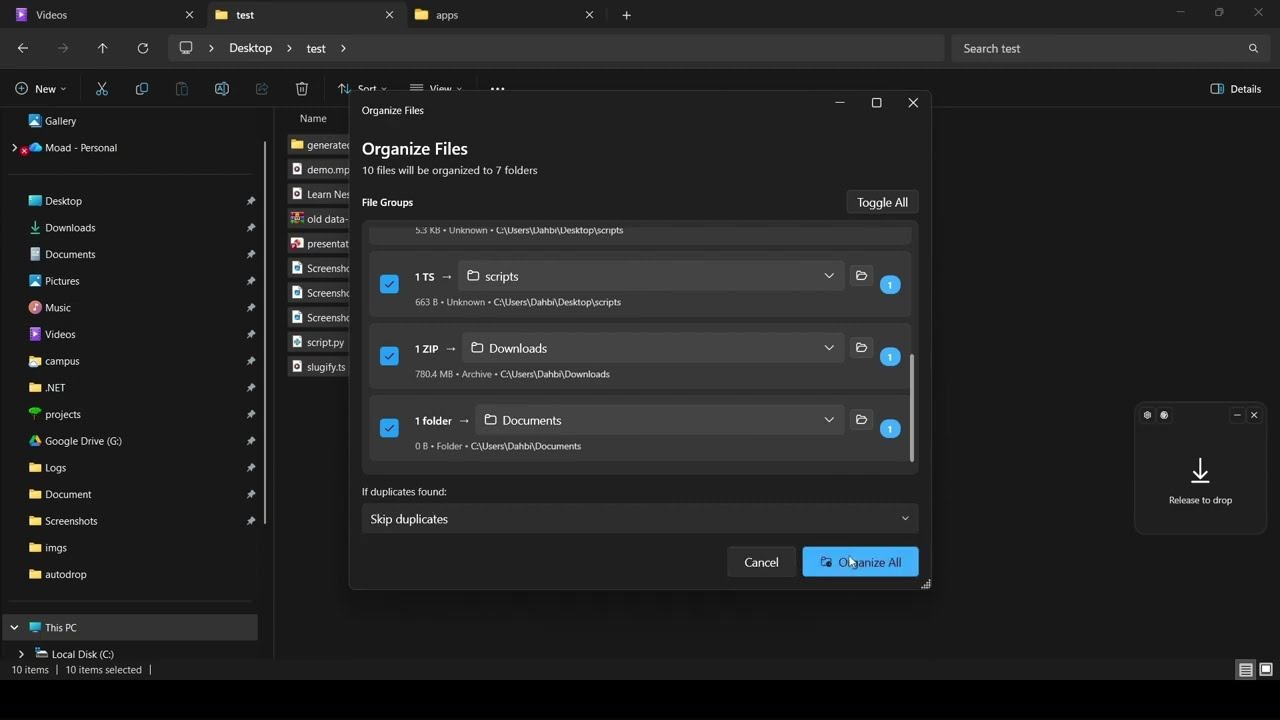
Select 10, 50, or 100 files and drop them all at once. AutoDrop queues each file, runs parallel AI analysis, and sorts them into their correct destinations without blocking the UI. A background queue manager handles the load while you keep working. Batch results are displayed in a summary view with one-click undo for any individual move.

View on GitHub
AutoDrop privacy settings showing Local AI offline mode selected with no cloud dependency

Your files never leave your machine

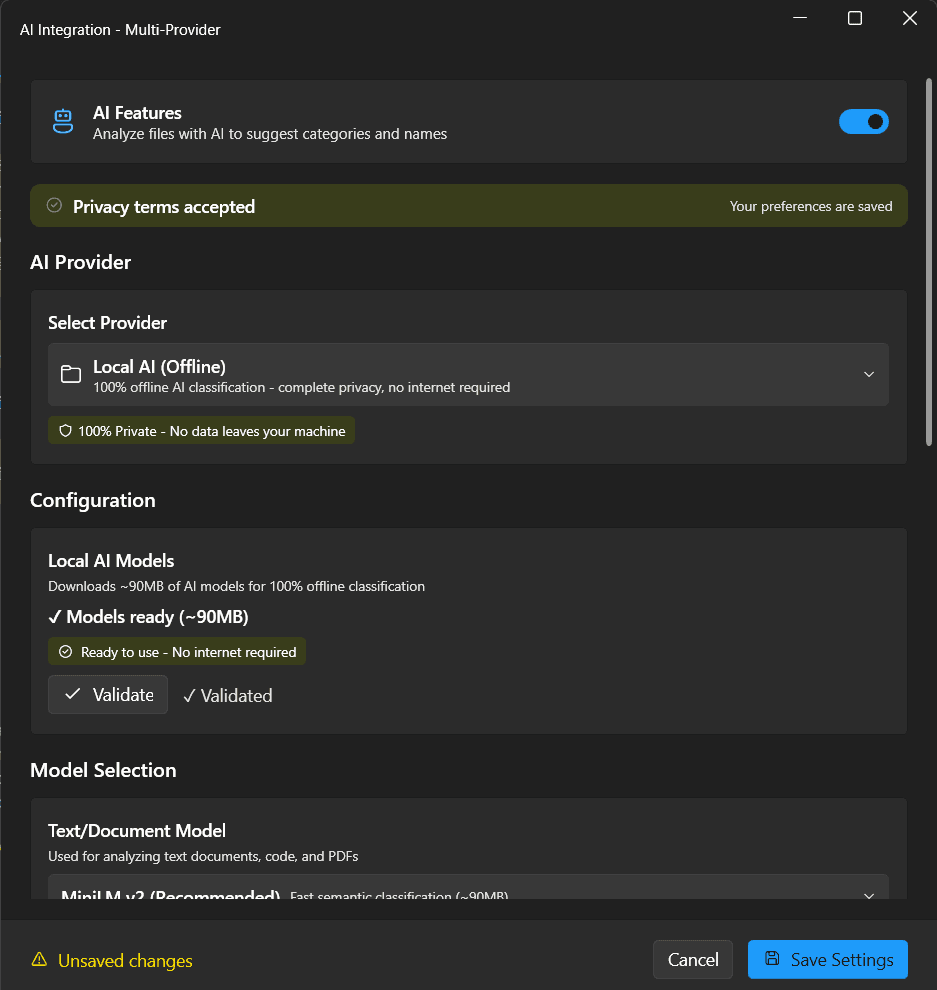
Switch to Local AI mode and every analysis runs 100% offline. No cloud calls, no API keys, no data leaving your device. AutoDrop ships with a built-in local model for fast, private classification right on your machine. For more power, connect Gemini 3, OpenAI, Claude, or Groq. API keys are encrypted with Windows DPAPI. Zero telemetry, zero tracking.

View on GitHub

Every move is reversible. Zero risk.

Every file operation is recorded with full rollback capability. One click undoes the last move, or browse the complete operation history to reverse any past action. AutoDrop shows a confidence score before each move to flag uncertain suggestions. Preview changes before applying. Your files are always safe — nothing is deleted, only moved.

View on GitHub

We all have that one folder. The Downloads folder.

A graveyard of PDF invoices, random screenshots, zip files you'll "organize later," and installers from years ago. Traditional tools only check file extensions. AutoDrop uses Gemini 3 to read and understand the actual content of your files.
Download AutoDrop
  • Hours Lost per Day

    2.5

  • Can't Find Files

    57%

  • Downloads Become Clutter

    83%

  • Days Wasted per Year

    38

Drag. Drop. Done. That simple.

AutoDrop combines Gemini 3 multimodal intelligence with a minimal floating interface. Files are analyzed by content, not filename, and sorted into the right folder in under 3 seconds.

  • Multimodal Vision

  • Smart Rules Engine

  • 5 AI Providers

  • Fluent Design UI

  • AutoDrop dark mode interface with Windows 11 Fluent Design
  • Organize all your files with one tool

    View on GitHub
  • Fluent Design UI

The AI Brain

Powered by Gemini 3 Multimodal Intelligence

AutoDrop doesn't just see files — it understands them. Gemini 3's multimodal vision reads images, PDFs, and documents to categorize by content, not filename.
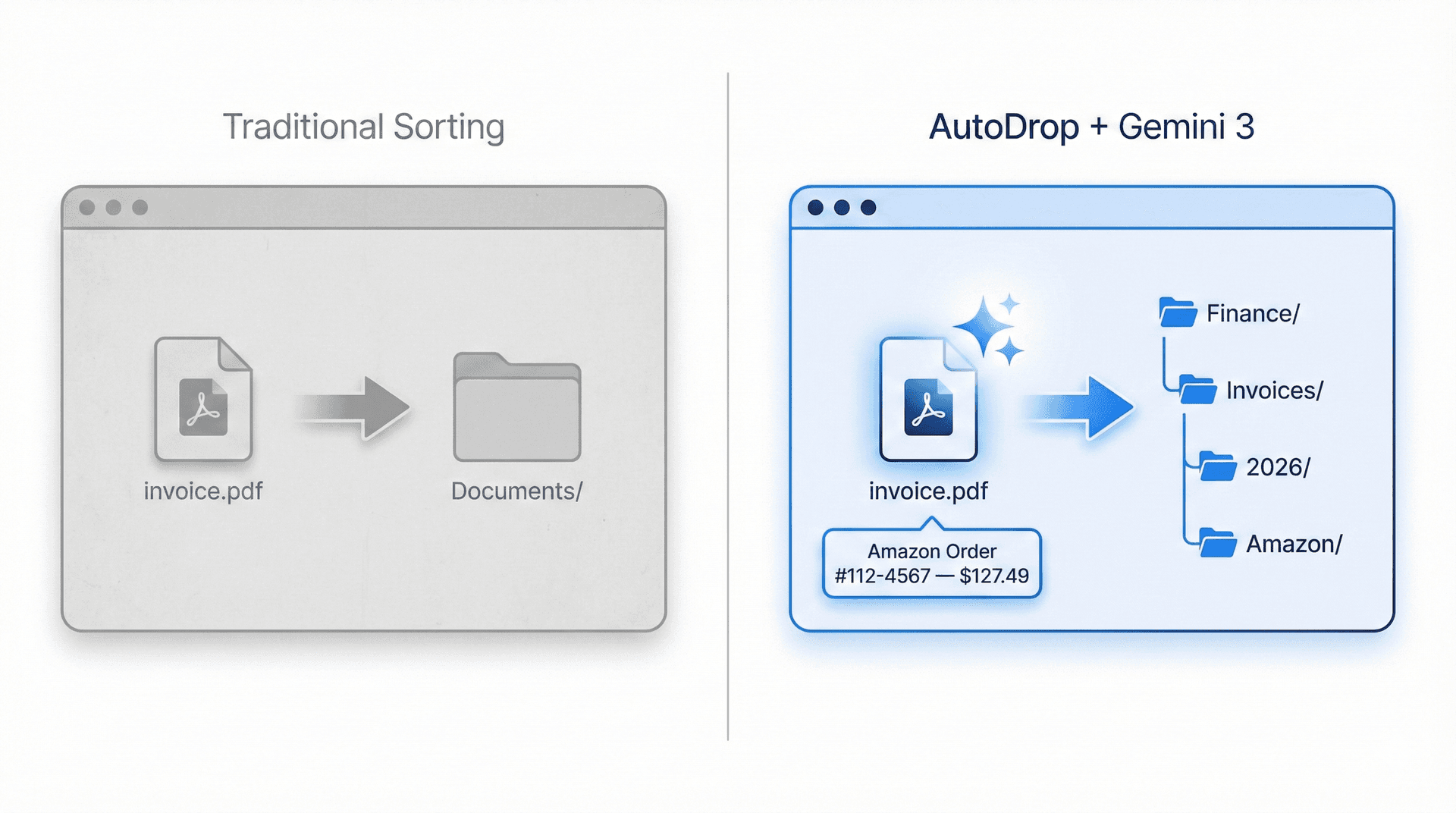
Traditional file sorting by extension versus AutoDrop AI-powered content analysis

The Multimodal Difference

Gemini 3 reads content, not just filenames.
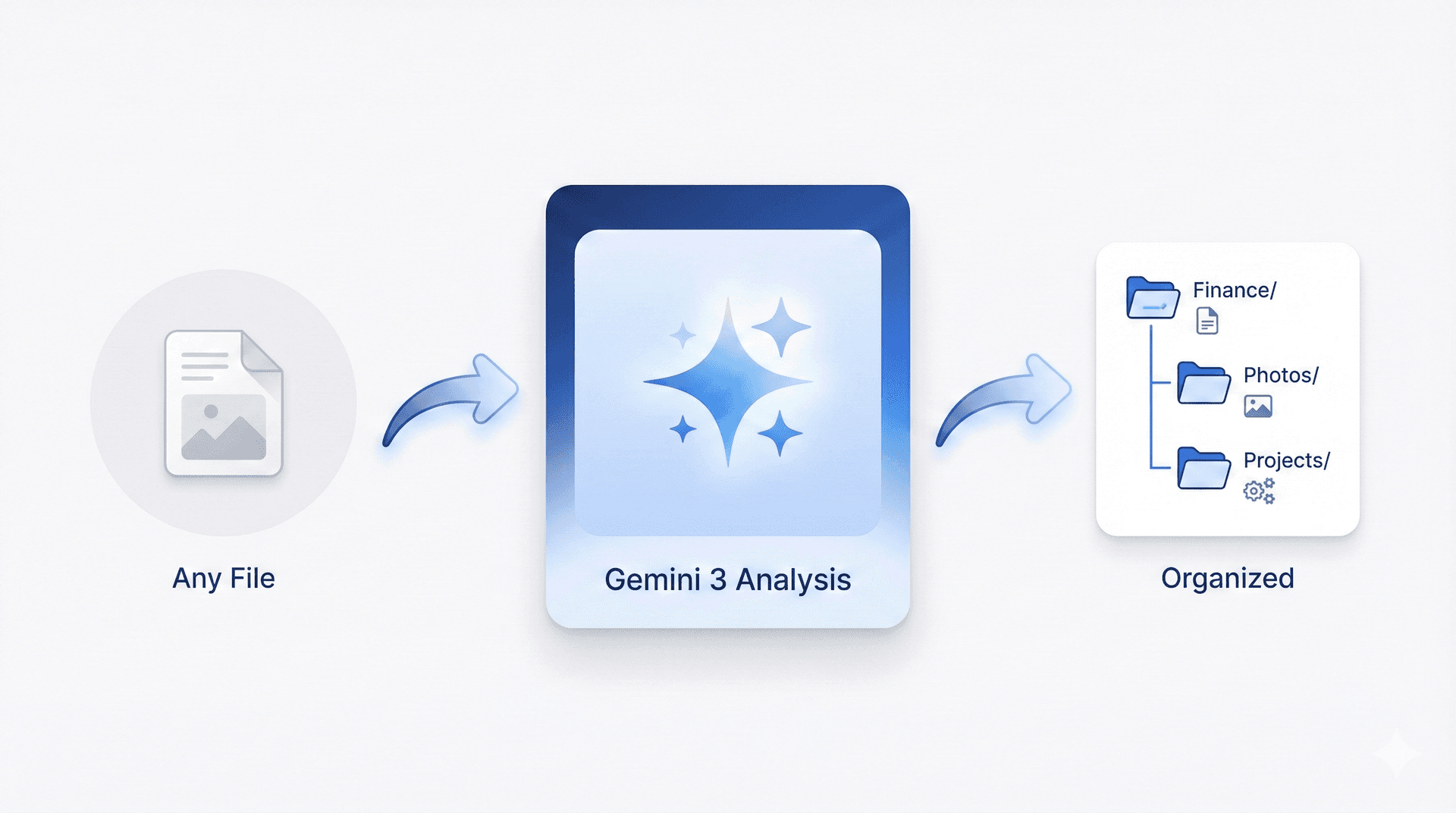
AutoDrop AI analysis pipeline showing file input, Gemini 3 processing, and organized output

Intelligent Pipeline

File in, Gemini 3 analyzes, perfect folder out.
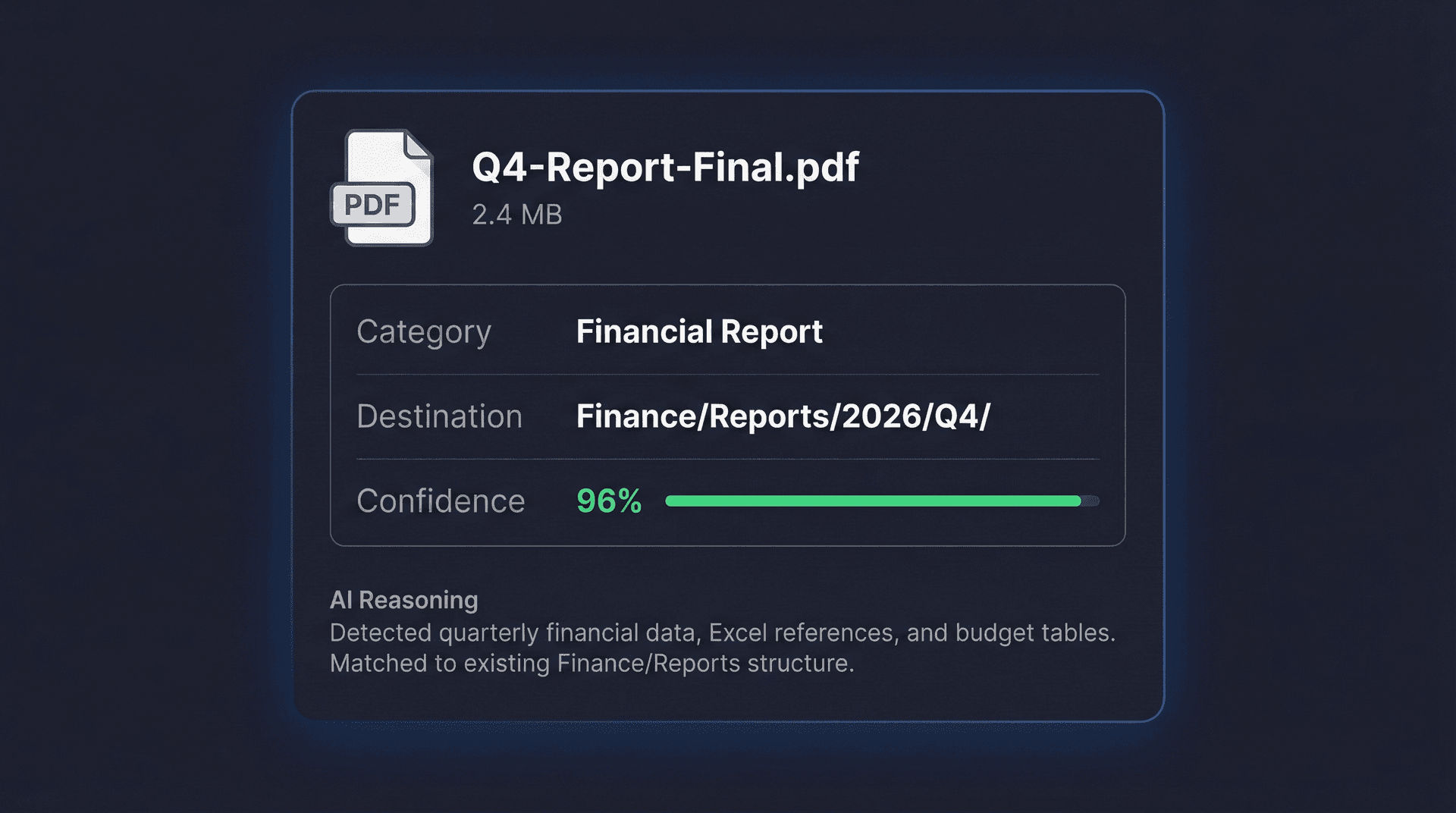
AutoDrop displaying Gemini 3 structured AI response with category, confidence score, and reasoning

Structured AI Response

Confidence scores, reasoning, and perfect categorization.
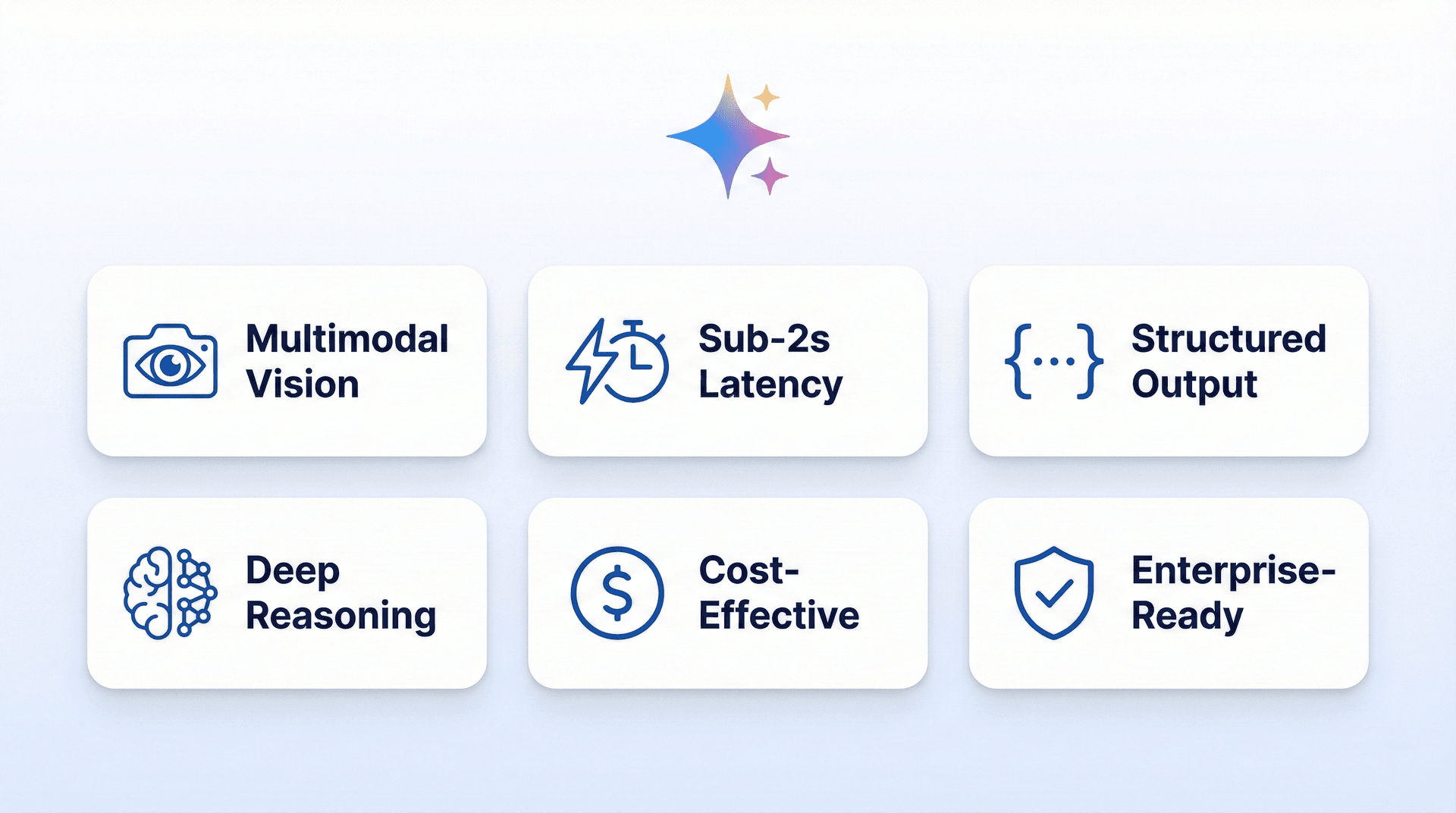
Why Gemini 3 infographic showing multimodal vision, sub-2s latency, structured output, and deep reasoning

Why Gemini 3

The best multimodal AI for file understanding.

View Source Code

Meet the Creator

Designed & Developed by Moad Dahbi

Software Engineer specializing in .NET, DevOps, and Cloud Architecture — building intelligent solutions that make a difference.

Moad Dahbi — Software Engineer and creator of AutoDrop

Moad Dahbi

Software Engineer

CTO & Co-Founder at iSoutien. Computer Engineering student at ENSA Tangier. Multi-certified across AWS, Azure, Java, and GitHub.

GitHubLinkedInEmail

Core Expertise

  • .NET 8 / C# / WPF / WPF-UI
  • Azure DevOps / AWS / Docker / CI/CD
  • React / Next.js / TypeScript
  • SOLID / MVVM / Clean Architecture
Dahbimoad.com

Certifications

  • ✓Java SE 8 Certified
  • ✓GitHub Foundations
  • ✓Azure Fundamentals
  • ✓AWS Cloud Practitioner
  • ✓Salesforce AI Associate
  • ✓Meta Front-End Developer

Frequently Asked Questions

Everything you need to know about AutoDrop, Gemini 3 integration, and privacy.

AutoDrop is an AI-powered desktop application that organizes your files automatically. Drag files onto the floating drop zone, Gemini 3 analyzes their content using multimodal vision, and suggests the perfect destination folder.

  • Multimodal AI reads images, PDFs, and documents

  • Content-based sorting, not just file extensions

  • Suggests folders with confidence scores and reasoning

  • Full operation history with one-click undo

Gemini 3 offers native multimodal capabilities in a single model. It can analyze images, read PDFs, and understand documents without switching between different APIs. Combined with structured JSON output and sub-2-second latency, it is ideal for real-time file analysis.

  • Native vision and document understanding in one API

  • Structured output with JSON schema enforcement

  • Sub-2-second response time for real-time use

  • Cost-effective compared to other multimodal models

AutoDrop includes a built-in Local AI mode that runs 100% offline on your machine. No data ever leaves your device. It is just another provider you can select — completely private and secure. API keys for cloud providers are encrypted with Windows DPAPI. There is zero telemetry and zero data collection.

  • Built-in local model for fully offline classification

  • API keys encrypted with Windows DPAPI

  • No telemetry or usage tracking

  • Choose your provider per session or per file type

AutoDrop supports multiple AI providers out of the box plus a built-in local mode. You can switch between them at any time based on your needs for speed, accuracy, cost, or privacy.

  • Google Gemini 3 (primary, multimodal)

  • OpenAI GPT-4 and Claude for alternative analysis

  • Groq for ultra-fast inference

  • Local AI for 100% offline, private processing

Yes. AutoDrop is 100% free and open source under the MIT license. The full source code is available on GitHub. You can use it, modify it, and contribute to it.

  • MIT licensed, fully open source

  • Source code on GitHub

  • Built with .NET 8, WPF, and WPF-UI Fluent Design

  • Professional MSI installer with auto-updates

Stop organizing files manually. Let AI handle it.

Free, open source, and powered by Google Gemini 3. Download AutoDrop and reclaim your time.

Download for Windows
Star on GitHub
AutoDropAutoDrop

AI-powered file organizer built with Google Gemini 3. Drag, drop, done.

GitHub
LinkedIn
Email

Product

  • Features
  • How It Works
  • Gemini 3
  • FAQ

Project

  • GitHub
  • Download
  • Report an Issue

Developer

  • Moad Dahbi
  • GitHub
  • LinkedIn
  • Email

Built by Moad Dahbi for the Google Gemini 3 Hackathon © 2026